
SIM Not Detected Error — Baseband Failure vs Software Misconfiguration
The SIM Not Detected Error is one of the most frustrating smartphone issues, preventing your device from connecting to the mobile network.Without a working SIM connection, your phone essentially becomes a mini tablet — no calls, no SMS, and no mobile data.
For many users, this error appears suddenly after a system update, phone drop, firmware flash, or network reset. Some users restart their device and the issue disappears. Others find that no amount of resetting fixes the problem.
The reason is simple: not all SIM errors are the same.
In many cases, the issue comes from software misconfiguration, which is easy to fix. But sometimes it indicates a deeper hardware-level problem called baseband failure, which requires advanced repair.
Understanding the difference between these two causes is critical. Fixing the wrong thing wastes time and can make the problem worse.
This guide explains how to diagnose SIM detection problems correctly, how to identify baseband vs software issues, and the exact steps to fix them.
Table of Contents
- What Does “SIM Not Detected” Mean?
- How Phones Detect SIM Cards
- Baseband Failure vs Software Misconfiguration
- Signs of Baseband Failure
- Signs of Software Misconfiguration
- Step-by-Step Troubleshooting Guide
- Advanced Fixes for Baseband Issues
- Preventing SIM Detection Problems
- Key Takeaways
- FAQs
What Does “SIM Not Detected” Mean?
When a phone displays SIM Not Detected, the device cannot communicate with the Subscriber Identity Module (SIM) installed in the SIM slot.
The SIM card contains essential network credentials such as:
- IMSI (International Mobile Subscriber Identity)
- Authentication keys
- Carrier information
Your smartphone reads this data through the baseband modem. If communication fails, the phone assumes no SIM is present.
Common messages include:
- No SIM card detected
- Insert SIM
- SIM not recognized
- Emergency calls only
- No service
According to smartphone repair data from iFixit, roughly 30–35% of SIM detection issues are caused by software glitches, while the remaining cases often involve hardware faults or baseband firmware corruption.
Modern mobile networks rely on SIM authentication standards defined by the Global System for Mobile Communications Association, which explains how SIM cards securely identify users on cellular networks.
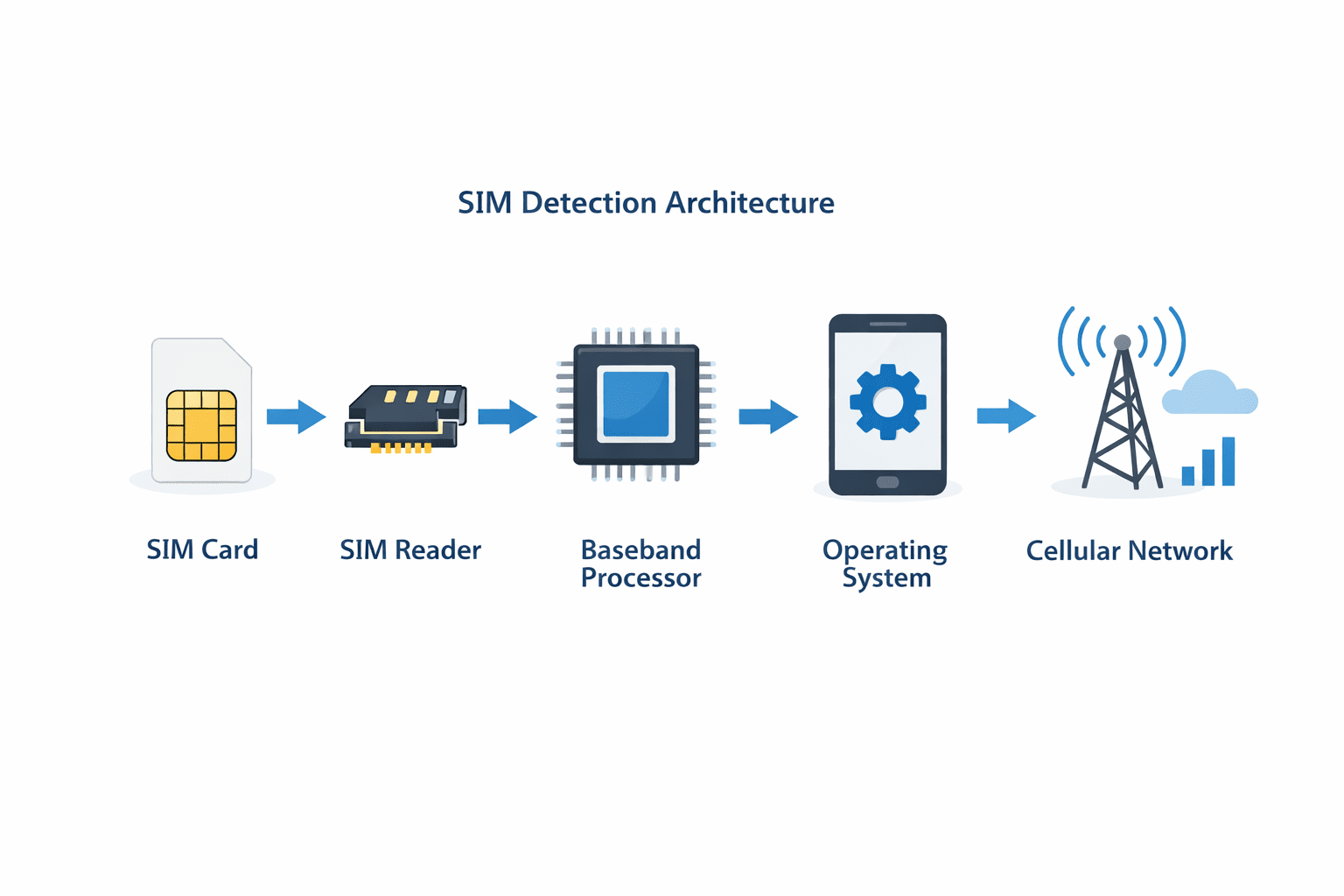
How Phones Detect SIM Cards
Before diagnosing the issue, it helps to understand how the detection process works.
Your smartphone uses several components:
1. SIM Card
Stores your network identity.
2. SIM Reader
Physical slot that connects the SIM card to the motherboard.
3. Baseband Processor
Handles cellular communication.
4. Radio Firmware
Controls network hardware and communication protocols.
5. Operating System
Manages configuration and network settings.
The detection sequence typically follows this process:
- Phone powers on
- Baseband firmware initializes
- SIM reader checks card presence
- OS reads SIM credentials
- Network registration begins
If any step fails, the phone may show SIM not detected.
Baseband Failure vs Software Misconfiguration
Understanding the difference between these two root causes is crucial.
| Issue Type | Cause | Difficulty | Fix |
|---|---|---|---|
| Software Misconfiguration | Settings errors, firmware bugs | Easy | Reset or update |
| Baseband Failure | Hardware or modem firmware damage | Hard | Repair or reflash |
Software problems affect system configuration and are reversible.
Baseband failures, however, occur when the modem firmware or chip stops responding.
Signs of Baseband Failure
A baseband failure is one of the most serious cellular issues in smartphones.
Common indicators include:
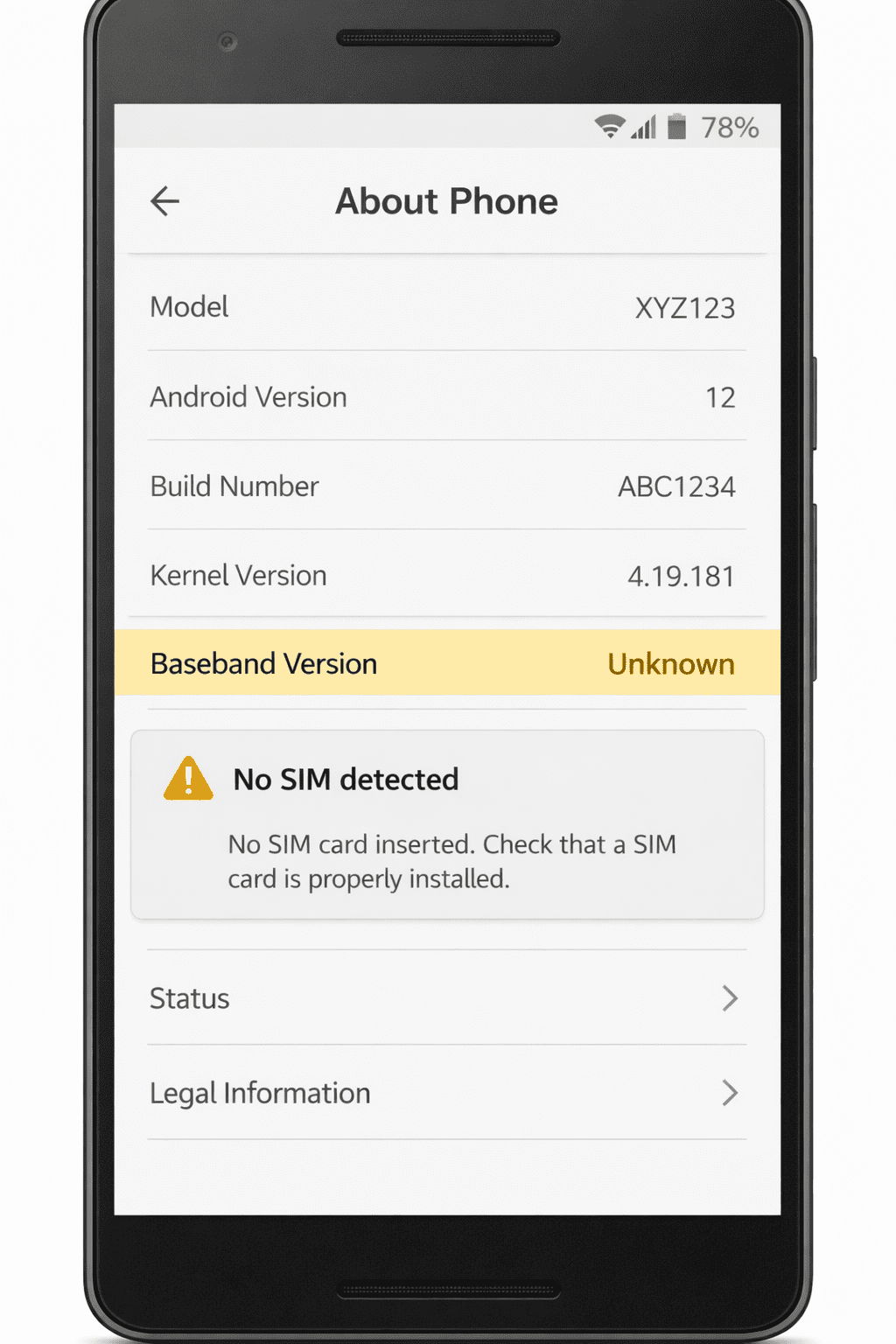
1. Baseband Shows “Unknown”
Check in:
Settings → About Phone
If you see:
Baseband version: Unknown
This usually means the modem firmware isn’t loading.
2. IMEI Shows as Null
Dial:
*#06#
If your device shows:
- IMEI null
- IMEI invalid
- No IMEI
This strongly suggests baseband corruption.
3. No Network Hardware Detected
You may see:
- No SIM detected
- No service permanently
- Network options disabled
4. Issue Appeared After Firmware Flash
Incorrect ROM installation can damage:
- modem partition
- radio firmware
- EFS partition
5. SIM Works in Other Phones
Testing the SIM in another phone confirms the SIM itself isn’t faulty.
Signs of Software Misconfiguration
Software-related SIM problems are far more common.
Typical symptoms include:
1. SIM Works After Restart
Temporary system glitches can break network initialization.
2. Issue Started After System Update
OS updates sometimes reset:
- carrier configuration
- APN settings
- modem initialization
3. Airplane Mode Bug
Phones occasionally fail to reconnect after airplane mode is disabled.
4. Network Settings Corrupted
Incorrect settings can break SIM communication.
Step-by-Step Troubleshooting Guide
Follow these steps in order to diagnose the problem.
1. Restart Your Phone
A restart resets the modem and network stack.
Steps:
- Hold the Power button
- Tap Restart
- Wait for reboot
If the SIM appears afterward, the issue was likely temporary.
2. Remove and Reinsert the SIM Card
Sometimes the card is simply misaligned.
Steps:
- Power off device
- Remove SIM tray
- Clean the SIM gently
- Reinsert correctly
- Power on
3. Test the SIM in Another Phone
This determines whether the problem is:
- SIM card
- phone hardware
If the SIM works elsewhere, the issue is on your device.
4. Reset Network Settings
Corrupted network settings are a frequent cause.
Steps (Android):
Settings → System → Reset → Reset Network Settings
This resets:
- WiFi
- Mobile networks
- Bluetooth
5. Enable and Disable Airplane Mode
This forces the modem to reconnect.
Steps:
- Enable airplane mode
- Wait 30 seconds
- Disable airplane mode
6. Check Baseband Version
Navigate to:
Settings → About Phone
If baseband shows Unknown, it indicates deeper issues.
7. Update System Software
Manufacturers often fix modem bugs in updates.
Steps:
Settings → Software Update → Check for Updates
Advanced Fixes for Baseband Issues
If the baseband is corrupted, advanced methods may be required.
1. Reflash Modem Firmware
Flashing correct modem firmware can restore connectivity.
Tools often used include:
- Odin (Samsung)
- Fastboot (Android devices)
- Manufacturer repair tools
This process restores the radio firmware partition.
2. Restore EFS Partition
The EFS partition stores critical network data including IMEI.
If damaged, phones lose network functionality.
Repair typically involves:
- EFS backup restoration
- professional repair tools
3. Hardware Repair
If the baseband chip itself fails, repair requires:
- motherboard-level solder repair
- modem chip replacement
This must be performed by a professional repair technician.
Preventing SIM Detection Problems
While not all problems are avoidable, good practices reduce risk.
Avoid Unverified Firmware
Custom ROMs can corrupt modem firmware if not compatible.
Backup EFS Before Flashing
Advanced users should always backup network partitions.
Keep System Updated
Manufacturers regularly patch modem bugs.
Avoid Physical Damage
Dropping phones can damage:
- SIM reader
- motherboard traces
- modem chip
If your device suffers physical damage or internal component failure, detailed repair guides from iFixit smartphone repair manuals show how SIM readers and baseband components are connected inside modern smartphones.
Key Takeaways
- SIM Not Detected errors usually come from either software misconfiguration or baseband failure.
- Software issues can often be fixed by restarting, resetting network settings, or updating firmware.
- Baseband failures typically show IMEI null or Baseband Unknown.
- Hardware damage or corrupted modem firmware requires advanced repair or reflashing.
- Diagnosing the root cause first saves time and prevents unnecessary repairs.
FAQs
Why does my phone say SIM not detected even with a SIM inserted?
This usually occurs due to network configuration errors, SIM tray damage, or baseband firmware problems.
How do I know if my baseband is broken?
Check Settings → About Phone. If the baseband version shows Unknown, it often indicates modem firmware or hardware failure.
Can a software update cause SIM detection issues?
Yes. Firmware updates sometimes reset network configurations or introduce modem bugs.
Does factory reset fix SIM not detected errors?
A factory reset may resolve software-related issues but will not fix hardware baseband failures.
Can a damaged SIM card cause this error?
Yes. Physical damage or wear can prevent proper contact with the SIM reader.
What does IMEI null mean?
IMEI null usually indicates EFS partition corruption or baseband firmware failure.
Conclusion
A SIM Not Detected error can stem from something as minor as a network glitch or as serious as baseband failure.
The key is accurate diagnosis.
Most users can fix SIM issues through simple troubleshooting steps like restarting the phone, reseating the SIM, or resetting network settings.
However, if the device shows Baseband Unknown or IMEI Null, the issue likely involves deeper modem firmware or hardware failure.
In such cases, advanced repair methods like modem reflashing or motherboard repair may be required.
By following the troubleshooting framework outlined in this guide, you can quickly determine whether your issue is software-related or hardware-based and choose the right fix.
Schema-Ready FAQ Section
Q1: Why does my phone say SIM not detected even with a SIM inserted?
A: This can occur due to network configuration errors, SIM tray damage, or modem firmware problems.
Q2: How do I know if my baseband is broken?
A: Check Settings → About Phone. If baseband shows “Unknown,” modem firmware may be corrupted.
Q3: Can software updates cause SIM detection issues?
A: Yes. Updates sometimes introduce modem bugs or reset network configurations.
Q4: Does factory reset fix SIM detection errors?
A: It can resolve software misconfiguration but not hardware baseband failures.
Q5: Can a damaged SIM card cause the problem?
A: Yes. Worn or scratched SIM cards may not connect properly with the SIM reader.
Q6: What does IMEI null mean?
A: It usually indicates EFS partition corruption or baseband firmware failure.